| | |
|
| |
| | |
|
|
Home
Okidata MB700 Series
|
Item Number: MB780/MB790
Manufacturer: Okidata
Manufacturer Part No: MB780/MB790
|
|
Overview
- Desktop and floor models available, with finishing and mail bin features2
- Versatile and simple to operate via 9" color touch-screen display
- Duplex (2-sided) printing standard
- Internal Ethernet card standard; optional wireless connectivity is also available
- 75-sheet duplexing automatic document feeder (DADF) enables scanning of both sides of a sheet in one continuous pass
- Color scanning with send-to functionality
- Robust copy features, including ID Card Copy
- Users can save personal settings on USB memory sticks and access them at any time
- High-capacity toner yields up to 36,000 pages3
- Rated at up to 275,000 pages/month duty cycle
- Memory upgradable to 1.28 GB, paper capacity expandable to up to 3,200 pages with options4
- 1-Year On-Site limited warranty with optional extensions6
- Live, toll-free technical support 24/7/3656
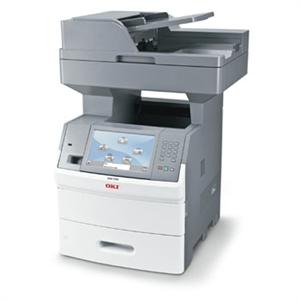
What the medium workgroup demands in a MFP. Above all, your workgroup wants to be productive. The MB700 MFP Series from OKI Printing Solutions responds with exceptional print and copy speed: all models deliver up to 55 crisp, clear prints/copies per minute (ppm/cpm), with the first copy appearing in as little as 8 seconds.1 These black & white MFPs pack a lot of paper and toner—dramatically reducing down-time from user interventions: up to 3,200 pages of paper capacity4 (with options), and high-capacity toner cartridges capable of lasting for up to 36,000 pages3. They're also designed to be easy and simple to use, with intuitive and customizable controls. Sharing files and documents is a snap– Place your document on the flatbed platen or in the 75-sheet duplexing automatic document feeder (DADF) and scan both sides in a single continuous pass. Save and send the electronic version to a folder on your PC, the network or FTP site, as an attachment to an e-mail address, or to a USB memory stick. Preview scans on screen – Before you scan and e-mail an important image file, see how it looks and fits on the page.7You can preview your scan on the 9" color touch-screen display, saving you time and eliminating errors. Manage traffic efficiently– When you e-mail a large file it won't cause a traffic jam on your network. That's because the MB700 MFP Series' traffic-shaping technology can partition your network traffic and designate lower bandwidth for outbound flows. This is especially useful for busy networks and externally hosted Web servers. Robust copy and fax features – Benefit from a rich range of advanced copy functions to boost your users' productivity, such as Priority Copy to interrupt long print runs temporarily; ID Card Copy to copy both sides of a card onto a single sheet; and Sample Copy to proof the first copy set before printing the remaining copies. MB700 MFP models also offer powerful fax features, including broadcast faxing, 500 speed dials with LDAP support, and fax memory of up to 900 pages5. Personalized user settings– The MB700 MFP Series lets multiple users save and re-access their personal settings on a simple flash drive, including their local address book, personal fax numbers, individual copy settings, and even their own touch-screen configuration. They simply walk up to the MFP, slide in their flash drive and the MFP literally transforms into their own personal device. Finish with a flourish – Choose the MB790f to staple multiple sets of documents of up to 50 pages each. Or organize your output with the 4-bin mailbox on the MB790m, which lets you assign each bin to a different user or a dedicated function—like one for incoming faxes, one for copies and one for regular output.
Download PDF Brochure
Detailed Product information at Okidata.com |
|
|
|